Safetensors: The Secure Model Serialization Format
31 July 2026Every day, thousands of pretrained models are downloaded from model repositories and loaded into applications without a second thought. Few people realize that the model file itself can be a security risk.
What are Safetensors?
Safetensors is a lightweight, data-only serialization format that enables the safe and efficient storage and distribution of machine learning model weights.

Hugging Face introduced Safetensors in 2022 as a safer alternative to traditional model serialization formats. As its adoption grew across the AI ecosystem, Hugging Face contributed the project to the PyTorch Foundation under the Linux Foundation in April 2026, placing it under vendor-neutral governance. This transition reinforces Safetensors as an open, community-governed standard, encouraging native support across PyTorch, TensorFlow, Flax, and emerging AI runtimes. As AI models are increasingly shared across platforms and organizations, a secure, interoperable serialization format is essential for ensuring portability without compromising security.
Why do we need Safetensors?
Before Safetensors, deep learning libraries primarily relied on Pickle, a universal object serialization feature of Python designed to serialize arbitrary Python object hierarchies into byte streams (.pkl). Pickle reconstructs Python objects by executing instructions stored in the file. Because Python classes can customize this process using __reduce__, loading an untrusted checkpoint with torch.load() can execute arbitrary system commands, posing a potential security risk.
Before demonstrating how pickle serialization can be exploited, let’s define a simple neural network (SimpleClassifier) with two linear layers:
import torch
import torch.nn as nn

class SimpleClassifier(nn.Module):

    def __init__(self):
        super().__init__()
        self.fc1 = nn.Linear(784, 128)
        self.relu = nn.ReLU()
        self.fc2 = nn.Linear(128, 10)

    def forward(self, x):
        return self.fc2(self.relu(self.fc1(x)))
The following proof-of-concept mimics a realistic PyTorch checkpoint by storing a model’s state_dict(), making the file appear completely legitimate. However, the checkpoint also overrides the __reduce__() method to embed a malicious payload. While the demo simply prints a message, a real attacker could replace the payload with commands to steal credentials, download malware, open a reverse shell, or perform virtually any action permitted by the user’s privileges.
import io
import os
import pickle
import torch

class MaliciousModelCheckpoint:

    def __init__(self, model):
        self.model_state = model.state_dict()

    def __reduce__(self):
        # malicious payload executed when torch.load unpickles the file
        cmd = "echo 'SECURITY BREACH: Arbitrary code executed during model load!'"
        return (os.system, (cmd,))

# instantiate our simple model architecture
model = SimpleClassifier()

# save malicious checkpoint pretending to store model state
buffer = io.BytesIO()
torch.save(MaliciousModelCheckpoint(model), buffer)

# loading the pickled model checkpoint triggers command execution automatically
buffer.seek(0)
_ = torch.load(buffer, weights_only=False)
Note that, starting with PyTorch 2.6, torch.load() defaults to weights_only=True, which restricts deserialization to tensor weights and mitigates this class of attacks for standard checkpoints. However, many existing checkpoints, legacy codebases, and workflows that require loading arbitrary Python objects still rely on weights_only=False, making Pickle-based serialization an ongoing security concern.
Other model serialization formats such as .pt, .pth, and .bin rely on Python’s Pickle serialization. While these formats are flexible, they inherit Pickle’s arbitrary code execution risks and lack features such as zero-copy loading. Other alternatives, including Protobuf and MsgPack, are general-purpose serialization formats rather than formats designed specifically for machine learning models, and they come with their own limitations.
| Serialization Format | Code Execution Risk | Zero-Copy Reading | Lazy Loading | File Size Limit | Primary Target |
|---|---|---|---|---|---|
Pickle (.pkl, .pt, .pth, .bin) |
❌ Arbitrary code execution | ❌ | ❌ | Unlimited | PyTorch checkpoints |
| Protobuf | ✅ Data-only | ❌ | ❌ | 2 GB | ONNX / Interoperability |
| MsgPack | ✅ Data-only | Partial | ❌ | Unlimited | General-purpose serialization |
| Safetensors | ✅ Data-only | ✅ | ✅ | Unlimited | Machine learning tensor storage |
Inside Safetensors
A .safetensors file uses a simple three-part binary layout:
-
Header Size (N)
An 8-byte unsigned little-endian integer indicating the byte length of the JSON header.
-
JSON Header
An N-byte UTF-8 JSON string containing tensor shapes, dtypes, byte offset ranges, and optional free-form
__metadata__strings. -
Binary Data Buffer
Continuous raw byte buffers storing raw tensor values in row-major layout.
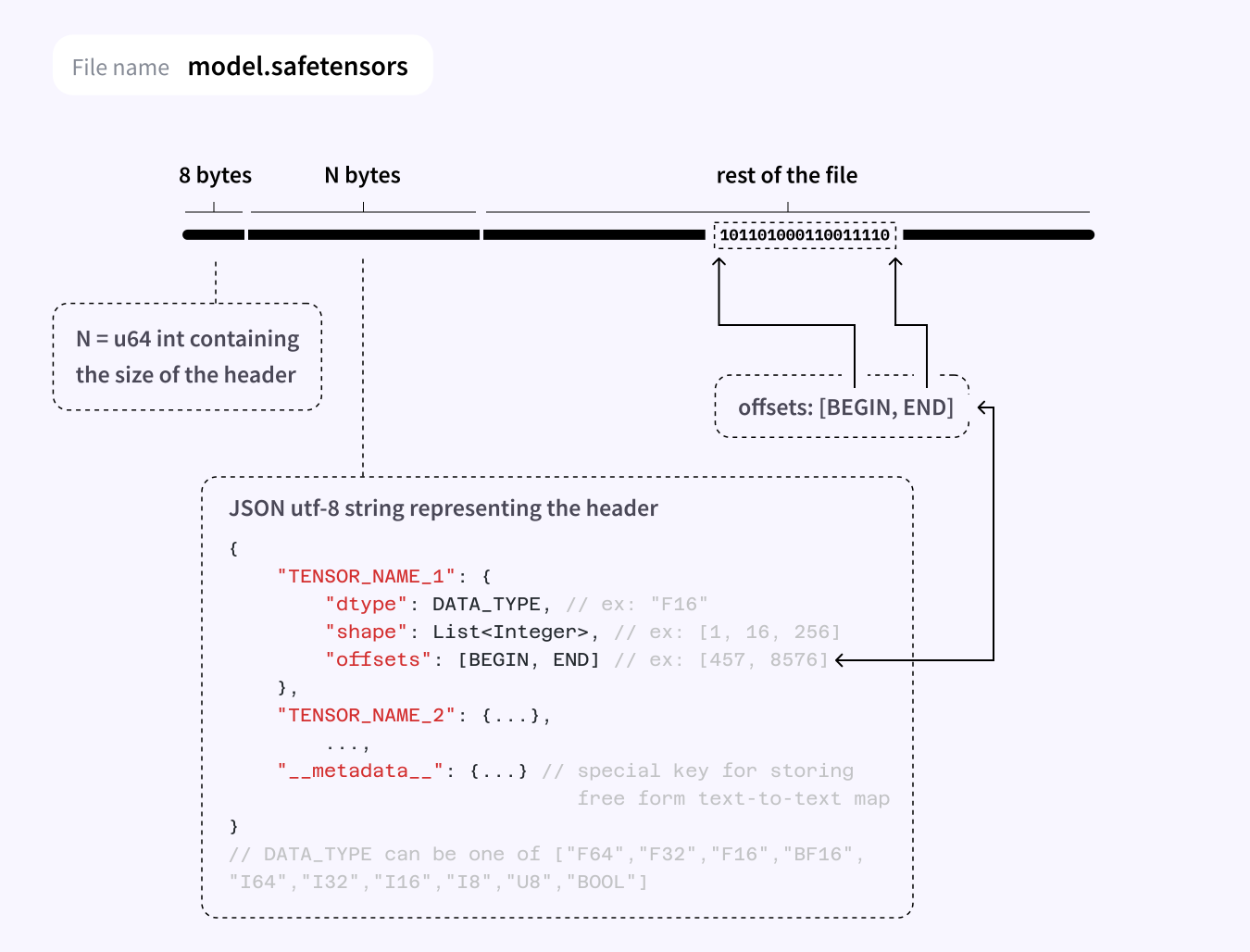
To guard against malicious inputs, Safetensors limits the JSON header to 100 MB and requires complete, non-overlapping coverage of the data buffer. Note that this limit applies only to the JSON header, not the binary model weights themselves. So, Safetensors files can still store models that are many gigabytes in size.
Here is a sample JSON header for the SimpleClassifier we defined above:
{
    "__metadata__": {
        "format": "pt"
    },
    "fc1.weight": {
        "dtype": "F32",
        "shape": [128, 784],
        "data_offsets": [0, 401408]
    },
    "fc1.bias": {
        "dtype": "F32",
        "shape": [128],
        "data_offsets": [401408, 401920]
    },
    "fc2.weight": {
        "dtype": "F32",
        "shape": [10, 128],
        "data_offsets": [401920, 407040]
    },
    "fc2.bias": {
        "dtype": "F32",
        "shape": [10],
        "data_offsets": [407040, 407080]
    }
}
Each tensor entry in the JSON header includes a data_offsets field, which specifies the byte range occupied by that tensor within the binary data buffer. For example, fc1.weight occupies bytes [0, 401408), while fc1.bias immediately follows at [401408, 401920). During loading, Safetensors verifies that these byte ranges are contiguous, non-overlapping, match each tensor’s expected size, and remain within the file boundaries. This guarantees a well-defined file layout, preventing malformed or malicious files from exploiting invalid or overlapping tensor regions.
Safetensors in Action
Integrating Safetensors into an existing PyTorch workflow requires only minimal changes. The examples below demonstrate the typical workflow: saving model weights with metadata, loading model weights, and lazily reading tensor slices.
Save
from safetensors.torch import save_file

model = SimpleClassifier()

save_file(
    model.state_dict(),
    "model.safetensors",
    metadata={"version": "1.0"},
)
Load
from safetensors.torch import load_model

model = SimpleClassifier()
load_model(model, "model.safetensors")
Lazy Load
It allows individual tensors to be read directly from a .safetensors file without loading the entire model into memory.
from safetensors import safe_open

with safe_open("model.safetensors", framework="pt", device="cpu") as f:
    # tensor-level lazy loading: load only the fc1.weight tensor
    fc1_weight = f.get_tensor("fc1.weight")
    # slice-level lazy loading: load only the first 10 rows of the tensor
    slice_handle = f.get_slice("fc1.weight")
    partial_tensor = slice_handle[:10, :]
Advantages of Safetensors
Secure by Design
Stores only tensor data and metadata, eliminating the arbitrary code execution risks associated with Pickle-based formats.
Zero-Copy Loading
Loads model weights directly from disk without first copying the entire model into memory, reducing memory usage and improving loading performance.
In traditional loading, the entire checkpoint is first read into RAM before the framework copies the tensor data into its own memory. This extra copy increases both loading time and peak memory usage.
Disk (20 GB checkpoint) → RAM: File Buffer (20 GB checkpoint) → RAM: PyTorch Tensors (20 GB checkpoint)
In zero-copy loading, the checkpoint remains on disk and is memory mapped (mmap) into the process’s address space. Tensor data is loaded into memory only when accessed, eliminating unnecessary memory copies and enabling more efficient loading of large models.
Disk (20 GB checkpoint) ──mmap──► Virtual Memory Mapping ──on demand──► RAM: PyTorch Tensors
Lazy Loading
Loads individual tensors (or even tensor slices) on demand, enabling efficient handling of large models and faster distributed inference.
Robust File Validation
Enforces strict header size limits and validates tensor offsets to protect against malformed or malicious files.
Cross-Framework Support
Unlike .pt or .pth, which are tied to PyTorch and Python’s Pickle serialization, Safetensors is a framework-independent format for storing tensor data. This allows frameworks such as PyTorch, TensorFlow, Flax, MLX, and C++ runtimes to adopt a common serialization standard without relying on framework-specific formats.
Open Governance
By joining the PyTorch Foundation under the Linux Foundation, Safetensors transitioned to vendor-neutral governance. This allows the format to evolve through open collaboration instead of a single company’s direction, ensuring long-term stability and broad industry adoption.
Takeaway
Safetensors has redefined how AI models are distributed by introducing a secure, data-only approach to model serialization. Combined with zero-copy loading, cross-framework adoption, and vendor-neutral governance under the PyTorch Foundation, it is set to become the modern standard for sharing machine learning models securely and efficiently.